


Apartments & Rentals - Zillow
4.89.38K Reviews
App Specs
- Version
- 2026.63.0.129963
- Updated On
- License
- Free
- Downloads
- 5,000,000+
- Developer
- Zillow Group
- Categories
- House & Home
- Platform
- Android, iOS
Screenshots
 Analysis by AppCompare
When I’m looking for a rental, I want to narrow the field before I spend an evening chasing listings that do not fit. Apartments & Rentals - Zillow gives me a practical place to begin: I can browse homes and apartments, compare possibilities, and keep a shortlist together while I work out what matters most. It is a free House & Home app from Zillow Group, and I see it as a useful search companion rather than a substitute for contacting a property manager or visiting a home.
A rental search that works best as a process
The app makes the most sense when I use it in stages. I start with a realistic area and budget, then tighten the search around the features that would genuinely change my day-to-day life. That order matters: if I begin with an overly long wish list, I can filter away reasonable options before I have a feel for what is available locally.
For example, someone moving for work might first compare commute-friendly areas, then weigh bedroom count against rent and practical needs such as a pet policy. A student or first-time renter may begin with a broader map and save a few different kinds of homes to understand the trade-offs. In either case, saved listings are more useful when they represent distinct choices, not a large pile of near-duplicates.
How it fits alongside other rental tools
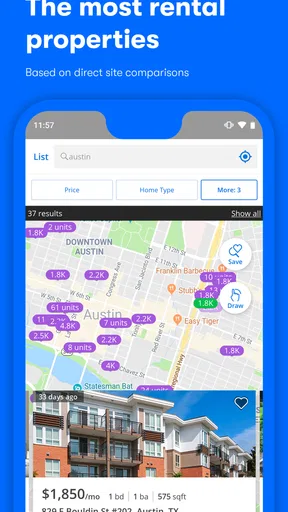
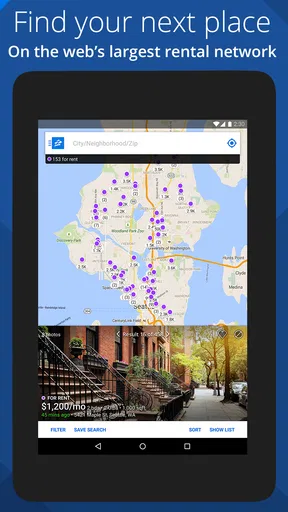
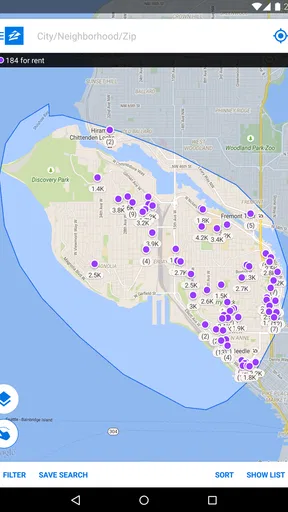
Compared with searching through general classified ads, a dedicated housing app can make it easier to scan property details and move between a listing and its location. Zillow’s map-based browsing is handy for judging whether a home is near the places that shape a routine, such as work, transit, or shops. It is also convenient to keep a shortlist in the same place as your search rather than relying on screenshots and scattered notes.
That does not make it the only tool I would use. Local rental sites, property managers’ own pages, and recommendations from people who live nearby can reveal options or neighborhood context that a broad search may not capture. I would use Zillow to build a picture of the market, then confirm important details directly with whoever is responsible for the property. A listing is a starting point for questions, not proof that every detail is current or that a home will suit you in person.
Small habits that make browsing more useful
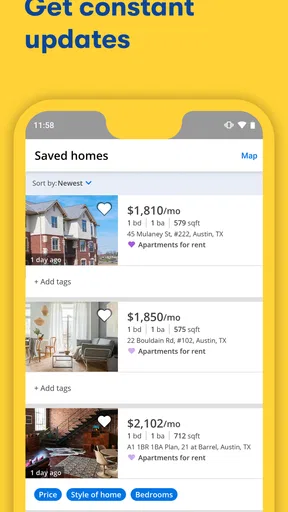
One practical trick is to save a few listings that are close to your needs even if they are not perfect. Comparing those against a favorite can help reveal which compromise is easiest to live with: a longer commute, less space, or a higher rent. I also find it helpful to note the reason for saving each place outside the app, especially when several listings start to blur together after a long browsing session.
Use the map as a decision aid, not just a way to find a pin. I would check the surrounding streets and likely routes at the times I expect to travel, then follow up on anything important with a local source. A map can orient you, but it cannot tell you what a commute feels like at rush hour or whether a block suits your routine. The same caution applies to photos and tours: they help screen options, but they cannot replace checking condition, noise, storage, and natural light during a viewing.
Worth Reading Before You Choose

Flipboard Shows What News Apps Must Do Beyond the Feed

Switching to Android Auto Means Rethinking Your Driving Routine

Google Calendar Makes a Crowded Week Easier to Manage

Ludo King Makes the Most of the Minutes Between Plans

Baby Panda World Brings Quick Play to Modern Phones, but Its Game Library Feels Busy

ESPN’s Live Game View Makes Following Close Games Easier
Notifications can help when timing matters, but I would keep the search criteria focused enough that alerts remain relevant. If every possible area and price range is included, updates can become noise rather than a useful nudge. When I see a promising new listing or a price change, I would check the details promptly and make a short list of questions before reaching out. That is more effective than treating an alert as a reason to commit immediately.
Who will get the most from it
This app is a good fit for renters who want to explore more than one neighborhood, compare different types of homes, or keep their options organized while they make a decision. It can also help someone who is just beginning a move: browsing gives a sense of what trade-offs may be involved before they start arranging viewings. People who already know a precise address or are dealing with one building may get more direct answers from that property’s leasing office than from a wide search.
I would not rely on the app alone if the most important part of the decision is local knowledge, a specialized housing need, or confirming a listing’s current status. In those cases, direct conversations and in-person checks matter more than a smooth browsing experience. It may also be a poor fit for anyone who expects a rental app to settle the final decision; the app can organize possibilities, but the renter still has to verify terms, availability, and suitability.
Current version and what that tells me
The app has been available since April 29, 2012, and its current version is 2026.43.0.126350. That history suggests a product with a long-running role in home search, while the version number identifies the current release without telling me, by itself, what changed in any one update. I would not assume a particular new feature from a version label alone. What matters to an existing user is whether the current build remains dependable for the tasks they already use: searching, reviewing listings, saving options, and keeping up with changes.
For renters, steady improvements are most valuable when they reduce friction in those everyday tasks. If you already have saved searches or favorites, it is sensible to check that they still reflect your present budget and location rather than continuing to browse on old assumptions. If you are new, give yourself a little time to learn which filters help and which ones are excluding too much. The app’s role is to make a changing search easier to manage, not to decide your priorities for you.
It is rated for Everyone and requires Android 10 or later on Android. With an average rating of 4.8 from around 74,000 ratings, and more than 5 million installs, it is clearly a widely used option. Those figures tell me that many people have tried it, but they do not guarantee that every listing will be relevant in every town or that every renter will prefer its approach. The right test is whether the homes and areas you care about are represented well enough to support your search.
The User Experience
First off, the user interface of Apartments & Rentals - Zillow is super intuitive. From the moment you launch the app, it greets you with a clean, straightforward dashboard. It’s like the app gets you. It knows you don’t have time to waste and wants to get you to your dream place pronto. You’ll find everything you need right at your fingertips, without any of the clutter.
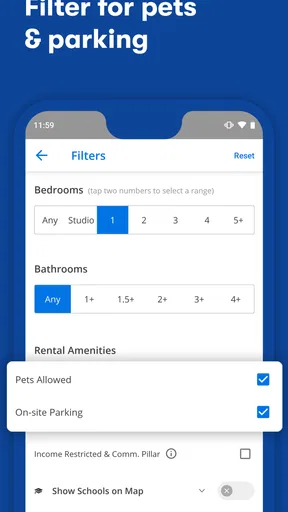
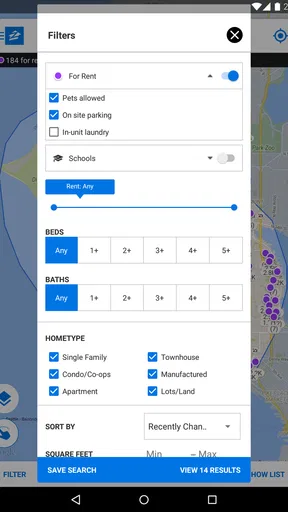
The search functionality is a breeze. You can filter by location, price range, number of bedrooms, and even pet policies. For those of us with fur babies, this feature is a lifesaver. Plus, the map view is spot on. You can easily see nearby schools, restaurants, and public transport options, all crucial when picking a new neighborhood.
Features That Shine
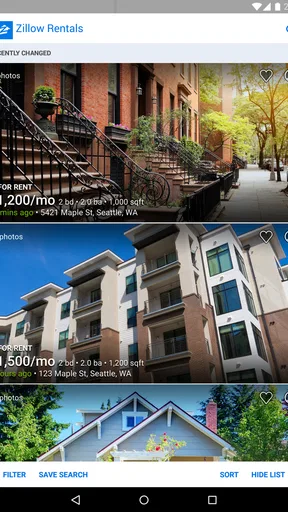
What really sets this app apart are the rich listings. Each property comes with high-quality images, detailed descriptions, and my favorite—virtual tours. It’s like stepping inside the apartment without ever leaving your couch. In today’s world, where we’re all about convenience, this feature is pure gold.
Another cool aspect is the ability to save your searches and favorite listings. The app keeps everything organized for you in one spot. So, if you’re like me and love to compare options before making a decision, this is super handy. Just tap, save, and revisit whenever you’re ready.
Staying Updated
Now, let’s talk about notifications. The app offers timely updates on price drops and new listings. It’s like having a personal assistant who keeps you in the loop without being intrusive. You won’t miss out on any potential deals, which is crucial in a competitive market.
Plus, the app syncs seamlessly with your Zillow account. Whether you’re browsing on your phone or checking out properties on your laptop, all your saved data is right there. It’s this level of integration that makes the home search process so much more streamlined.
Room for Improvement
Of course, no app is perfect. There are a few features I’d love to see refined in future updates. Sometimes the app can be a bit slow to load images, especially when browsing multiple listings quickly. It’s not a deal-breaker, but it’s something to be aware of if you’re in a hurry.
Also, while the app does a great job at providing detailed information, I think there’s room to expand on user reviews of neighborhoods. We all know that a neighborhood’s vibe can make or break your living experience, so more insights there would be a welcome addition.
Final Thoughts
All in all, Apartments & Rentals - Zillow is a robust tool for anyone diving into the apartment hunting process. It’s got the features, the functionality, and the ease of use that make it a top contender in the real estate app world. While there’s always room for improvement, the app’s strengths far outweigh its minor shortcomings.
So, if you’re on the hunt for a new place, I’d say give this app a try. It might just make your search a whole lot easier and maybe even a little fun. Happy house hunting!
Pros
- User-friendly interface for easy navigation.
- Comprehensive search filters for precise results.
- Detailed property listings with high-quality photos.
- Real-time updates on new listings and price changes.
- Integration with mortgage calculators and agents.
Cons
- Limited international property listings.
- Occasional lag in loading property details.
- Some features require in-app purchases.
- Notifications can be overwhelming at times.
- Inconsistent data accuracy in remote areas.
FAQs for Apartments & Rentals - Zillow
What features does the Zillow app offer for apartment hunting?
The Zillow app provides a comprehensive suite of features for apartment hunters, including detailed listings with photos, virtual tours, and neighborhood information. Users can filter searches by price, amenities, and location. Additionally, the app offers a map view, real-time notifications for new listings, and the ability to save favorite properties for easy access later.
Is the Zillow app free to use, and are there any hidden costs?
Yes, the Zillow app is free to download and use for browsing listings. However, some advanced features, like Zillow Premier Agent services, may involve fees if you choose to engage with them. Additionally, while browsing is free, rental applications or credit checks facilitated through the app might incur extra costs.
Can I contact property managers or landlords directly through the app?
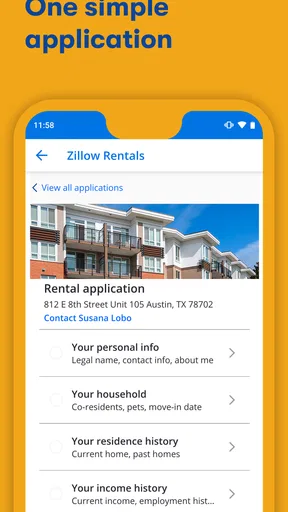
Absolutely. The Zillow app allows users to contact property managers or landlords directly through the contact feature on each listing. You can send messages, schedule tours, and even apply for rentals within the app, making it a convenient tool for direct communication during your apartment search.
How reliable is the information on Zillow, and how often is it updated?
Zillow strives to provide accurate and up-to-date information by pulling data from various sources, including MLS feeds and direct inputs from landlords and property managers. Listings are frequently updated to reflect real-time availability, though it's always a good idea to verify details directly with the property manager.
Does the Zillow app support international listings or is it only for the U.S.?
Currently, the Zillow app primarily focuses on real estate listings within the United States. While it provides comprehensive coverage across U.S. cities and states, users looking for international rental options might need to explore other platforms that specialize in global real estate listings.


